
Hey there,
Adding a barcode scanner in your Canvas App is quite common requirement now and whenever you scan something, you need some sort of validation for the scanned values.
As far as I experienced, validation approaches for Canvas App scanner value are different based on your data volume.
Scenario: You are validating that the scanned Warehouse name is a valid Warehouse in your Fin & Ops application. Because, in Fin & Ops generally we can’t expect large number of warehouses. So this sort of validation required comparatively simple approach.
So let’s see that approach with example.
My Canvas App
To demonstrate this scenario, I have created a simple Canvas App with a scan screen for Warehouse and we’ll perform a validation for a scanned warehouse name.


“Scanned Warehouse Name” will show a warehouse name that you’ll scan from a barcode.
“Valid Warehouse” will show “Yes”, if the scanned warehouse is a valid warehouse, it will show “No” for invalid warehouse.
Validation Approach:
If you are dealing with small data volume like our example, then you can easily use below expression On “Text” property of “Valid Warehouse” control to validate the scanned warehouse name.
If(IsBlank(LookUp(<‘Datasource name’>, <‘Column name’> = <‘Scanner Control Name’>.Text ))), “No”, “Yes” )
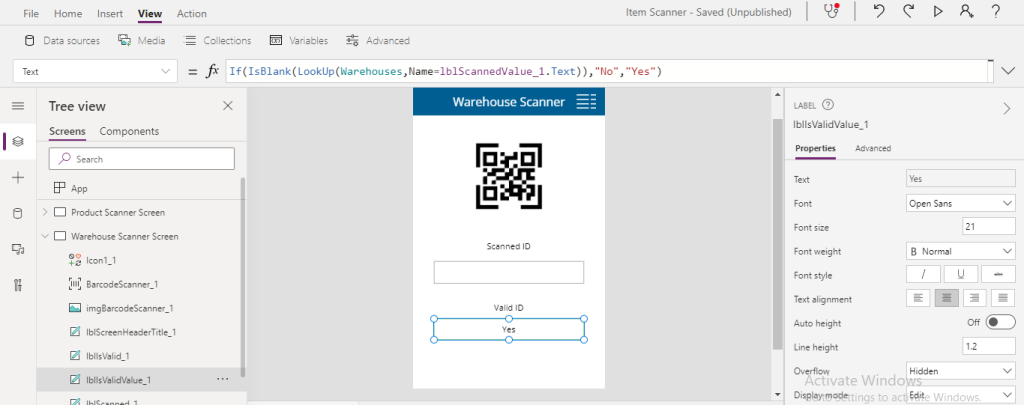
It’ll work fine as far as your data volume is small in your data-source (“Warehouses” in our case).


Note: I’m assuming that you’re aware that you can only test barcode scanner in your mobile device as of now.
But if you are dealing with large data volume so you need to take another way to maintain validation accuracy. We’ll see that approach in our next blog.
So stay tuned and Keep up the good work.
Thank you!
References:
- https://abkblogs.home.blog/2021/01/30/power-apps-data-validation-canvas-apps-scanner-part-2/
- https://powerapps.microsoft.com/en-us/blog/make-barcode-scanning-apps-in-minutes/
- https://docs.microsoft.com/en-us/powerapps/maker/canvas-apps/get-started-create-from-blank
- https://docs.microsoft.com/en-us/powerapps/maker/canvas-apps/controls/control-new-barcode-scanner
- https://barcode.tec-it.com/en/QRCode?data=Yorkville%20000_016
 Ammar Kamal's Blogs
One thought on “Power Apps: Data Validation Approach for Canvas Apps Barcode Scanner [Part 1]”